Pushup counter · Rep counter · Press-ups
The pushup counter that keeps count for you
PushUp Challenge is a free pushup counter and rep counter app for iPhone and Android. It counts by the set, not with your camera: one tap logs a set's reps, or the interval timer logs every set by itself as each alarm fires. Your daily total, streak and stats update instantly.


How it works
How the pushup counter works
01
Set your set size
Choose how many reps make a set (10, 15, 20, whatever you do) and a daily target, like 100 pushups a day.
02
Tap, or let the timer count
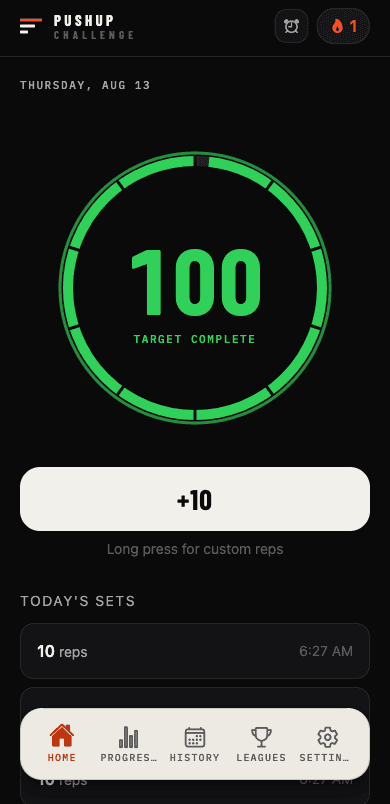
One tap adds a set to today's count. Long-press for an exact number. Or run the interval timer and each set logs itself when the alarm fires.
03
Watch the total climb
The ring fills with every set and turns green when you hit your target. Every set is saved to your history, with streaks and stats on top.
Hands-free
A rep counter you don't have to touch
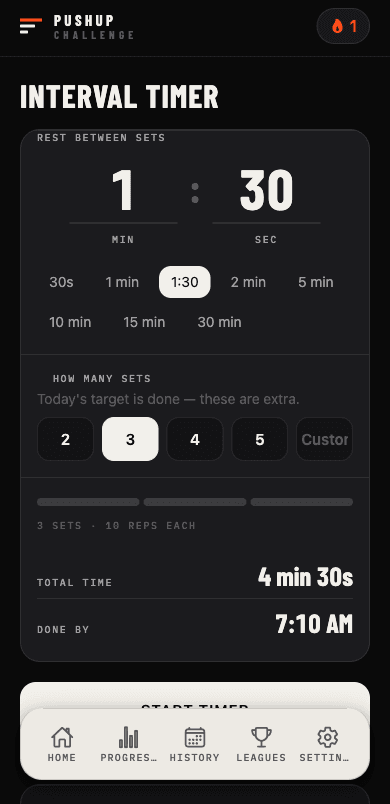
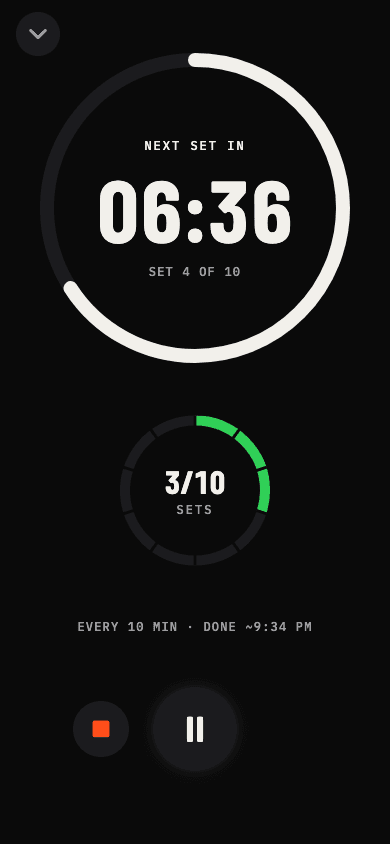
Set the number of sets and the rest between them, say 10 sets every 10 minutes. The alarm calls each set and counts it for you, even with your screen off. Tap the countdown for fullscreen focus: a timer you can read from the floor, portrait or landscape, with your sets ticking up beside it.
Compared
Set counter vs camera rep counter
Camera-based pushup counters try to spot every rep on video. PushUp Challenge counts sets instead. Here's the trade-off.
| PushUp Challenge | Camera counters | |
|---|---|---|
| What it counts | Whole sets: one tap adds your set size, long-press for exact reps | Each rep, detected from video |
| Where your phone goes | Anywhere: on the floor, in a pocket, across the room | Propped up, facing you, in frame |
| Camera | Never used | On for the whole workout |
| Hands-free | Yes, with the interval timer's auto-log | Yes, while you stay in frame |
| Accuracy | Exactly what you log | Depends on angle, lighting and form |
| Wall, incline, knee pushups | Counted the same way | Depends on the detector |
Same app
Push-up, pushup or press-up?
All the same exercise, and all counted the same way. Call them press-ups, push-ups or pushups: set a daily target, log your sets and the tracker keeps the score. Can't do a full one yet? Wall, incline and knee pushups count too. See pushups for beginners.
FAQ
Pushup counter questions
How do I count pushups with the app?
Set your set size once — say 10. Each time you finish a set, tap the big button and 10 reps are added to today's total. Did a different number? Long-press the button and type the exact reps. Your ring, streak and stats update straight away.
Can the pushup counter log sets hands-free?
Yes. Start the interval timer with a number of sets and a rest time, and with auto-log switched on each set is logged the moment its alarm fires. You never have to touch the phone mid-workout.
Why doesn't it use the camera to count reps?
Camera counters need your phone propped up, lit and pointed at you, and miss reps at the wrong angle. Counting by the set works face down on the floor, in the dark, in a hotel room, or with the phone across the room — and the camera is never switched on.
Does it count press-ups, knee pushups and wall pushups too?
Yes. The counter counts whatever you log — full pushups, press-ups, knee, incline or wall pushups. The premium Trainer also tracks which variant each level uses. See the Trainer's 12 levels
Is the pushup counter free?
Yes. The counter, interval timer, daily target, streaks, stats, history and joining leagues are free. Premium adds the 12-level Trainer and creating leagues.
Free pushup tracker · iOS & Android
Start counting today